Creating and Submitting Medicaid Batches
Start by going to Medicaid > Service Bureau Claiming > Claim Batch Listing
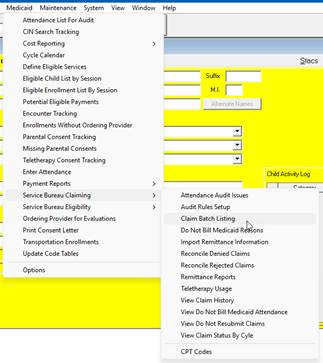
Start by clicking the Create New Batch Button
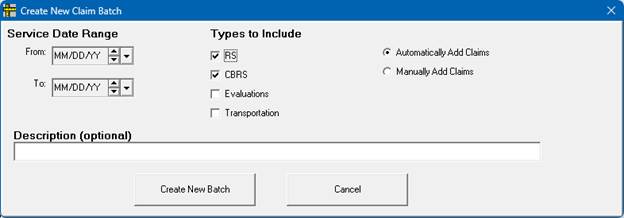
This will open a new window, Select the Service date range, services to include, and choose to have Preschool Automatically add Claims or if the batch should be Blank for you to manually add claims.
A description can be added if desired.
*Please ensure that the Service Date Range is within the Current eMedNY Claiming Limit*
When you are ready click Create New Batch
Once the Batch is created it will open the Claim Batch Details, this screen will display everything that is on the batch, as well as everything that is available to be added or items with problems that prevent them from being added to the batch.
On the batch, claims are sorted into four categories.
Tab | Description |
Claims in Batch | Claims that have already been added to the current batch |
Claims that can be Added | Claims that meet the batch criteria (dates and types) and pass all the audits |
Additional Claims with Warnings | Claims that meet the batch criteria (dates and types) however they did not pass an audit that are of type “WARNING” |
Additional Claims with Problems | Claims that meet the batch criteria (dates and types) however they did not pass one or more audits that are of type “FAILURE” |
On the Claims that can be added tab, you can select claims you want to add, right click and add them to the batch.
If you want to remove claims from the batch, you can select them, right click and remove them from the batch.
If you determine that there is a claim with problems that prevent it from being claimed and that those problems can never be corrected you can mark it as Cannot Ever Claim.
Select a reason
You can add reasons to this dropdown.
On the Additional Claims with Warnings tab, or the Additional Claims with Problems tab you can view Audit failures by double clicking on them.
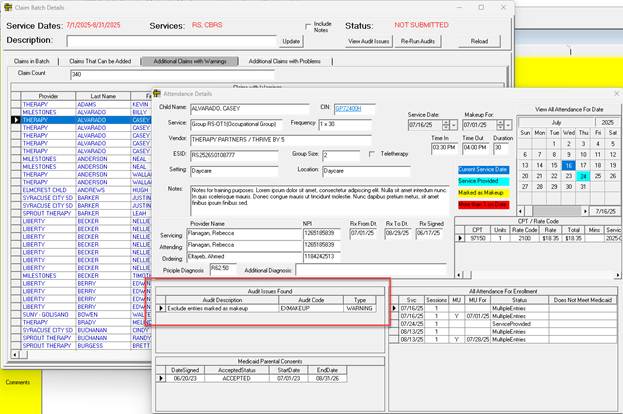
Some things can be fixed, others cannot be fixed.
When you are ready you can submit the batch to MSB.
We ask for a digital signature confirming your intent to submit claims to Medicaid.
Type in your name and click the check box
Click the “Submit Claims” button