Troubleshooting STAC Approval Discrepancies
When you need a STAC correction done, and you see that the correction has been entered on the blue STAC screen:
(Say, for example, we need the rate of this RS to be $60.)
But the problem is that the STAC approval is still not updated with the new $60 rate:
This indicates a possible disconnect between SED and your Preschool. Below are the steps to troubleshoot this.
Judging:
-If the SED summary says that the update is there now, then you're set.
-If the correction is still not there, proceed to section B:
B. Checking if the STAC has been sent up to SED at all:
1. Right-click the STAC record on the top list and select "View STAC-1 Transactions".
 2. Look for the dates in the "Batch #" column; it will show you the date when this STAC was sent up.
 3. Find the batch with the latest date, double-click the "To SED" line of that batch.
4. It will then show you what was sent to SED for approval.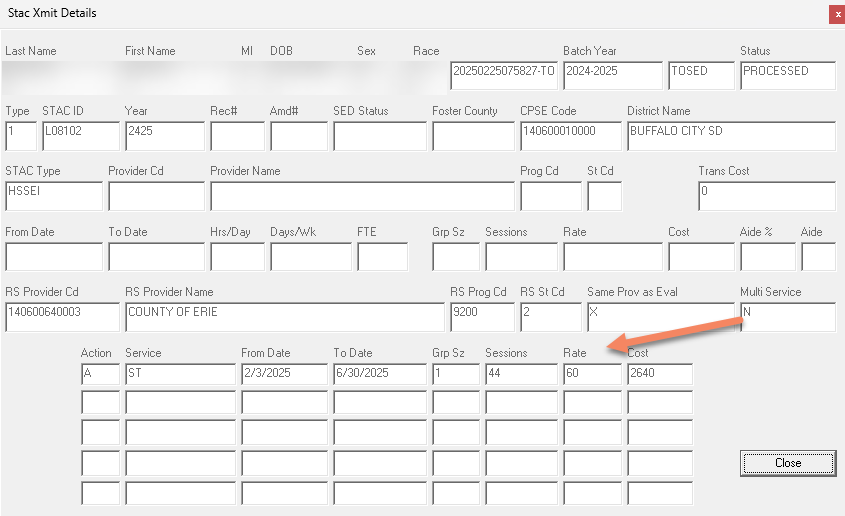
Judging:
-If the correction is included in the details of what was sent, then SED received the amendment and rejected it. In this case, fix the STAC rejection and resend the STAC batch.
-If the correction is not included in the details of what was sent, then SED did not receive the amendment. You should then send up a STAC batch for this school year: Submitting STAC-1s to NYSED - CPSEPortal
Article ID: 760, Created: 2/5/2026 at 11:04 AM, Modified: 2/9/2026 at 11:39 AM