What to do in Preschool after a Special CB Program is approved by SED (eSTAC's Counties)
*This article assumes that the STAC for the child has been created by the district in eSTAC’s, synchronized into Preschool, and then sent on paper to and approved by NYSED*
After you get confirmation that the STAC is approved by SED, make sure that the STAC transmission method is marked as PAPER.
Note: Once the Special Program is selected this STAC will always be rejected if it is sent electronically as all amendments must go to SED on Paper.
First Select the correct STAC on the STAC Scree, then Click Details.

Select Paper as the transmission method and then click Apply and Ok.
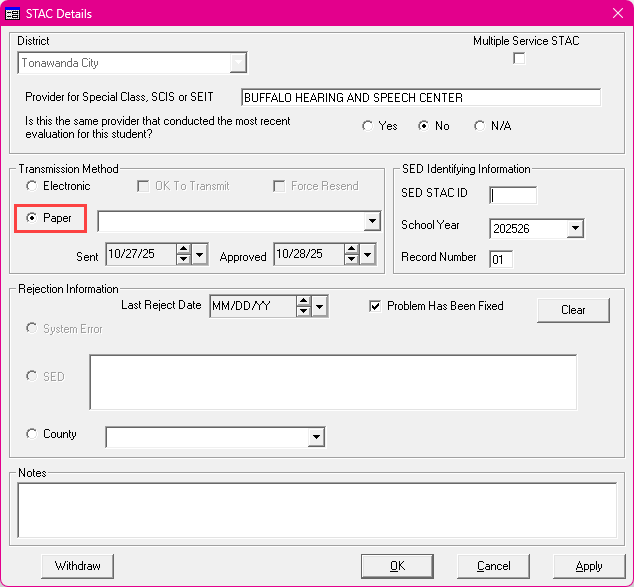
Once the STAC is set to Paper you will need to change the program on the STAC Screen.
Note: If the correct Special Program is not available, make sure you import the programs for the provider into Preschool. http://support.cpseportal.com/kb/a116/update-sed-program-listing-includes-rate-changes.aspx
To Change the Program, just click Edit on the correct STAC and then select the correct Program in the Program Dropdown. Then Click Apply and Ok.
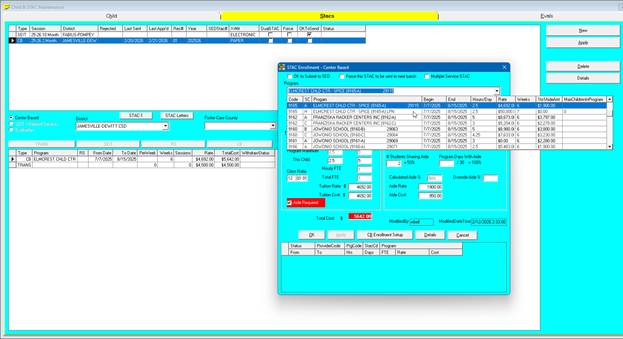
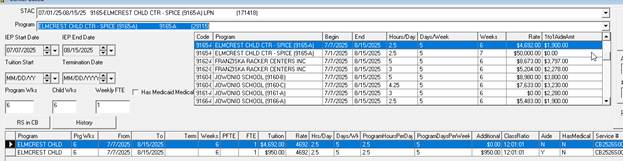
Then the Program on the Enrollment screen needs to be updated.
For both the Tuition and the Aide click the Program Dropdown and select the correct Program. Then click Apply.
Finally, make sure that the child’s STAC is matched to the summary Files.
http://support.cpseportal.com/kb/a115/download-sed-summary-file-stac-eval.aspx