Creating an Additional Payment Batch for Month (Non-CPSE Portal Users Only)
There are a few reasons you would want to create an additional payment batch for the month; the most common would be that a provider has sent multiple vouchers for a single month's services.
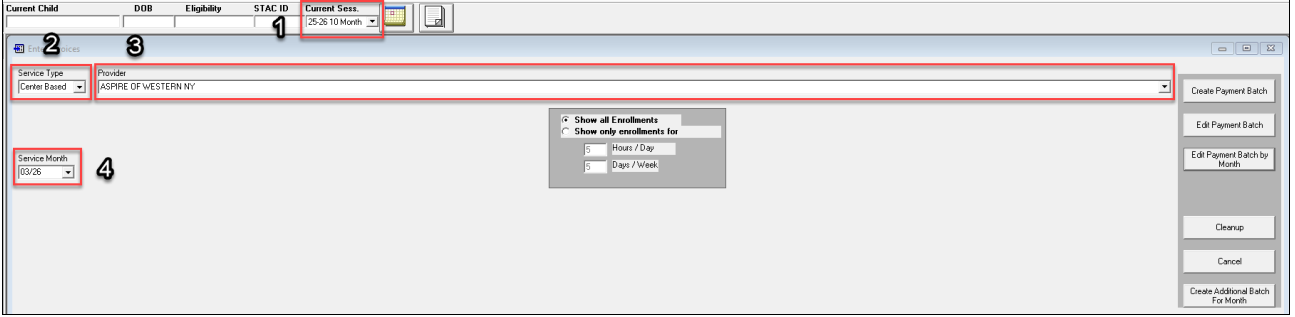
Create the payment Batch (Payments>> Enter Invoices)
- Select School year session
- Select service type
- Select Provider
- Select Service Month
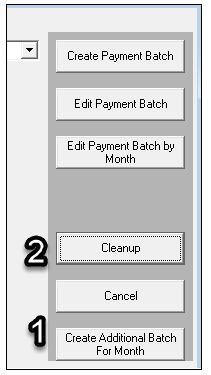
Click “Create Additional Payment Batch for Month” and “Cleanup
- No pop-up will display after “Create Additional Payment Batch for Month”.
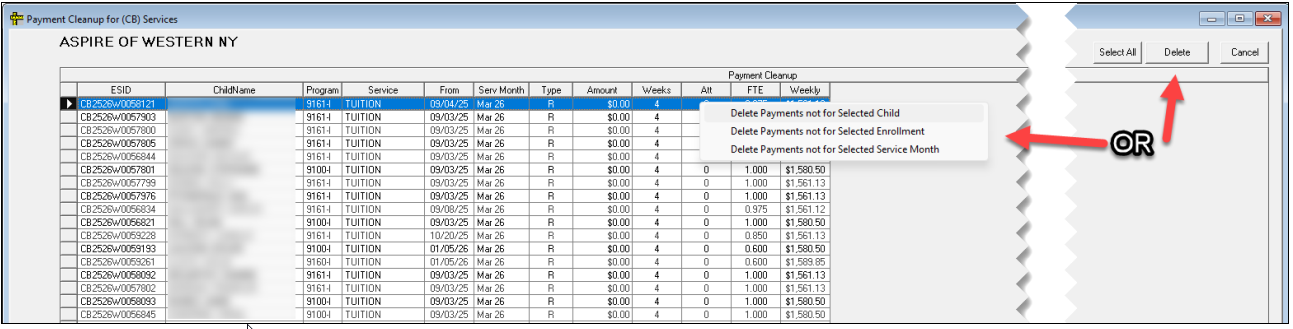
- View items in batch under “Cleanup”
- Delete lines by child and enrollment by right-clicking, or individually with the “Delete” button
Process Payment Batch

For information on processing invoices, please see the knowledge article below:
https://support.cpseportal.com/kb/a634/creating-payment-batches-in-preschool.aspx
Article ID: 807, Created: 4/27/2026 at 8:09 AM, Modified: 4/27/2026 at 8:09 AM